
Article
Redesigning MO Marketplace: Four Shops Behind One Home Screen
How I audited a Sri Lankan marketplace app, found that three features I assumed were missing already existed, and redesigned its home screen and checkout flow in four days for a take-home design assessment.
Chapters
- 1. Four Shops Wearing One Coat
A home screen that never told a first-time visitor MO is four different shops.
- 2. Walking the Product Before Judging It
Three research passes packed into a four-day window, and three assumptions that turned out to be wrong.
- 3. Fixing the Reference, Not Replacing It
MO's own reference design pointed the right way, so I kept its structure and fixed seven problems in it.
- 4. One MO, Four Ways In
A page that answers what MO is, what's happening now, and what's here for me, in that order.
- 5. One Product, Two Platforms
Desktop keeps the same names, colours and card anatomy, and spends the extra width on navigation.
- 6. Ranking the Rest of the App
Seventeen improvements ranked by how directly they touch trust, cost or payment.
- 7. A Prototype That Can Fail
A clickable HTML prototype built to show what happens when something goes wrong, not just the happy path.
- 8. Design Honest Enough to Show It
A deliberately small system where glass is reserved for chrome, and ratings can't lie.
- 9. What I'd Test Next
Five decisions I'd defend, and the studies I'd run before trusting any of it.
Chapter 1
Four Shops Wearing One Coat
A home screen that never told a first-time visitor MO is four different shops.
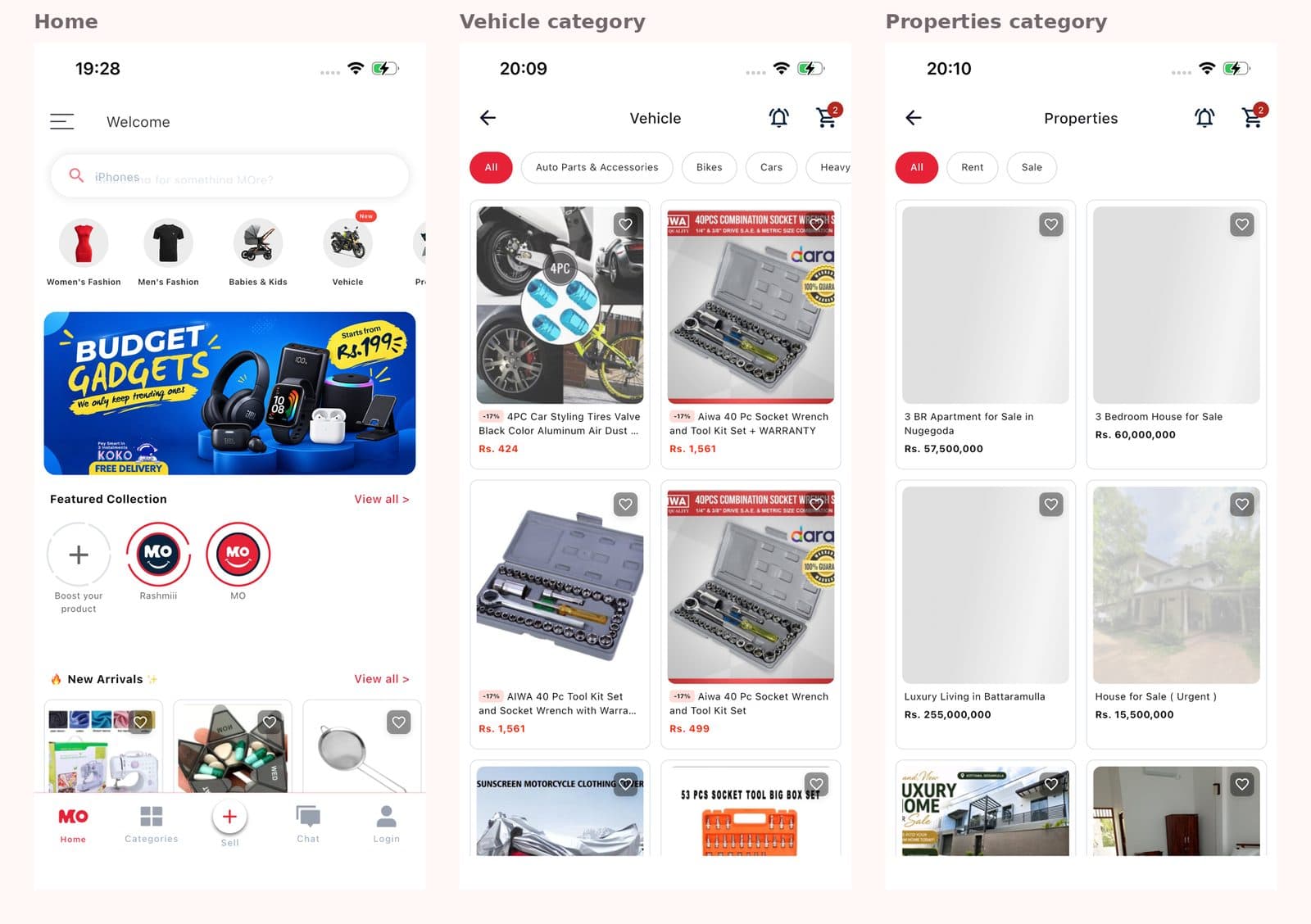
MO Marketplace is a Sri Lankan buy-and-sell app with four very different shops under one roof: Super Mall for brand-new stock from official stores, Second Hand for pre-loved and thrifted goods, Vehicles for cars, bikes and three-wheelers, and Properties for homes and land for sale or rent. Each serves a different shopper in a different frame of mind, but today a visitor can't tell any of that from the home screen.
In the app, Vehicles and Properties sit as ordinary category circles next to Women's Fashion. Second Hand, MO's real differentiator, only shows up at the bottom of an endless feed. On the website, the "Vehicle" category turns out to be 177 car accessories, and a banner states that second-hand items are available only on the app.
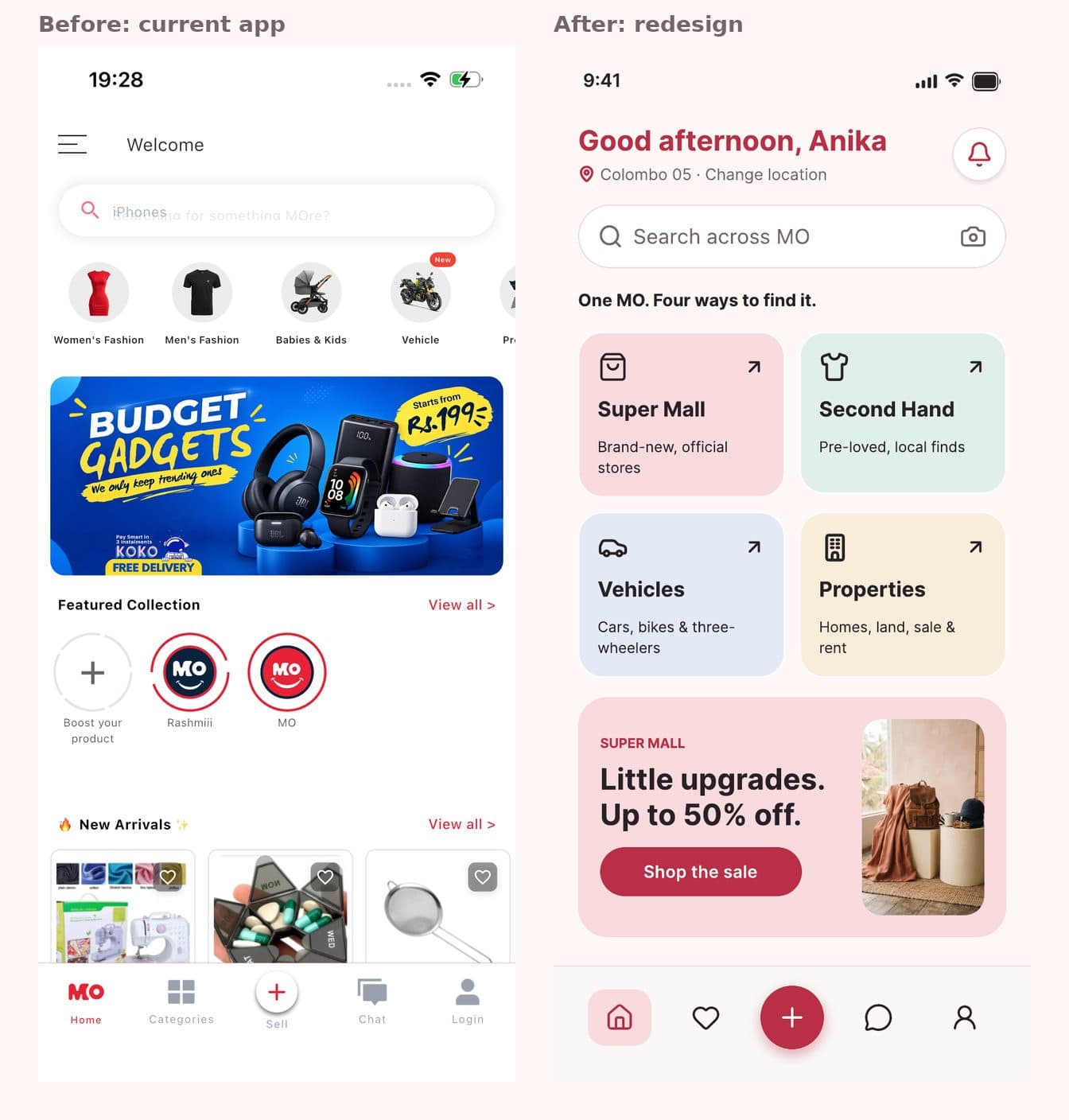
The brief asked for a home screen redesign, for app and web, so a first-time visitor understands within seconds that MO offers four experiences and how to enter each one, plus a prioritised list of UX improvements for the rest of the app. This is an independent concept I built for a take-home design assessment. I'm not affiliated with MO Marketplace, and none of it shipped.
Chapter 2
Walking the Product Before Judging It
Three research passes packed into a four-day window, and three assumptions that turned out to be wrong.
Before designing anything, I wanted to know what MO already did well and where it broke down, so I spent part of the four days I had on three research passes before opening Figma. An app walkthrough went from first launch to selling, capturing 61 iPhone screenshots and logging 32 checks in a spreadsheet, of which 21 turned up an issue. A website audit reviewed mo.lk at 1440 pixels wide and compared it with the app check by check, and 13 of the 32 checks had no web equivalent at all. An inspiration review studied Depop, Etsy, Facebook Marketplace and Pinterest for patterns that solved MO's specific problems, rather than layouts to copy.
The walkthrough corrected assumptions I had written down before ever opening the app. I had assumed MO had no wishlist, no meet-up option and no payment step. All three exist, just hard to find. The wishlist sits ninth in a profile menu, next to a second, separate "Favourite Items" list. Meet-up is a seller setting the buyer never sees. Payment happens after a button labelled "Place Order." That shifted most of the fix list toward surfacing what MO already had, rather than inventing features it didn't need.
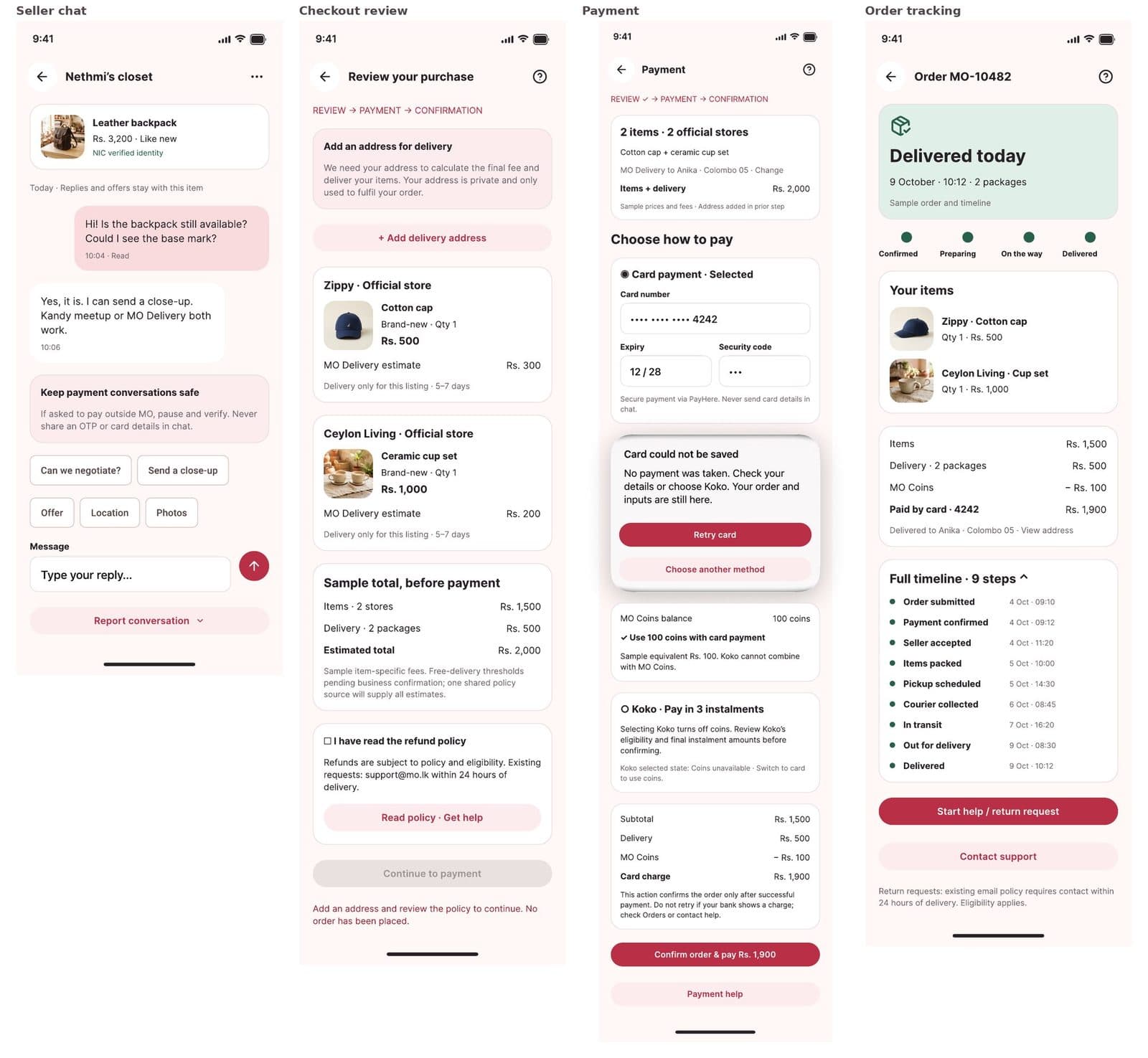
Other findings were sharper. A seller with zero sales displayed a five-star rating, and all three of their reviews came from the same person. Free delivery started at Rs 599 in the app, Rs 2,500 in the website header, and Rs 3,000 in the website cart. The last thing before "Place Order" was an "I agree to no refunds" checkbox, and the button beneath it actually opened payment.
Some things already worked well and stayed exactly as they were: typo-tolerant search, an editable AI listing draft, clear delivery choices for sellers, nine-step order tracking, and chat quick replies.
Chapter 3
Fixing the Reference, Not Replacing It
MO's own reference design pointed the right way, so I kept its structure and fixed seven problems in it.
MO supplied a reference design as a starting point: four tiles, a promotion, a flash sale, and a shelf for each experience. It pointed in the right direction, but reading it closely turned up seven problems, so I kept the structure and fixed those rather than starting over.
Chapter 4
One MO, Four Ways In
A page that answers what MO is, what's happening now, and what's here for me, in that order.
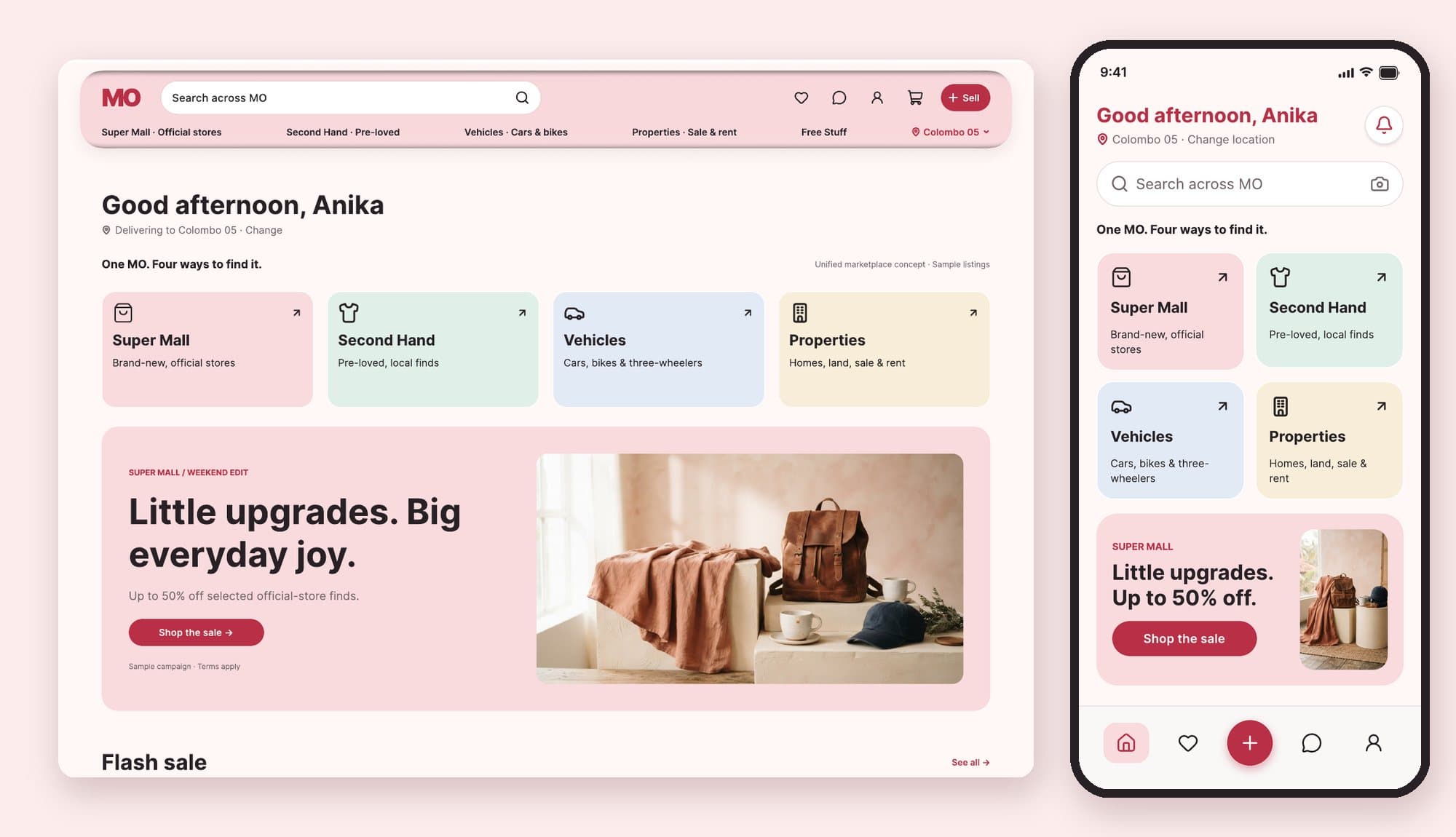
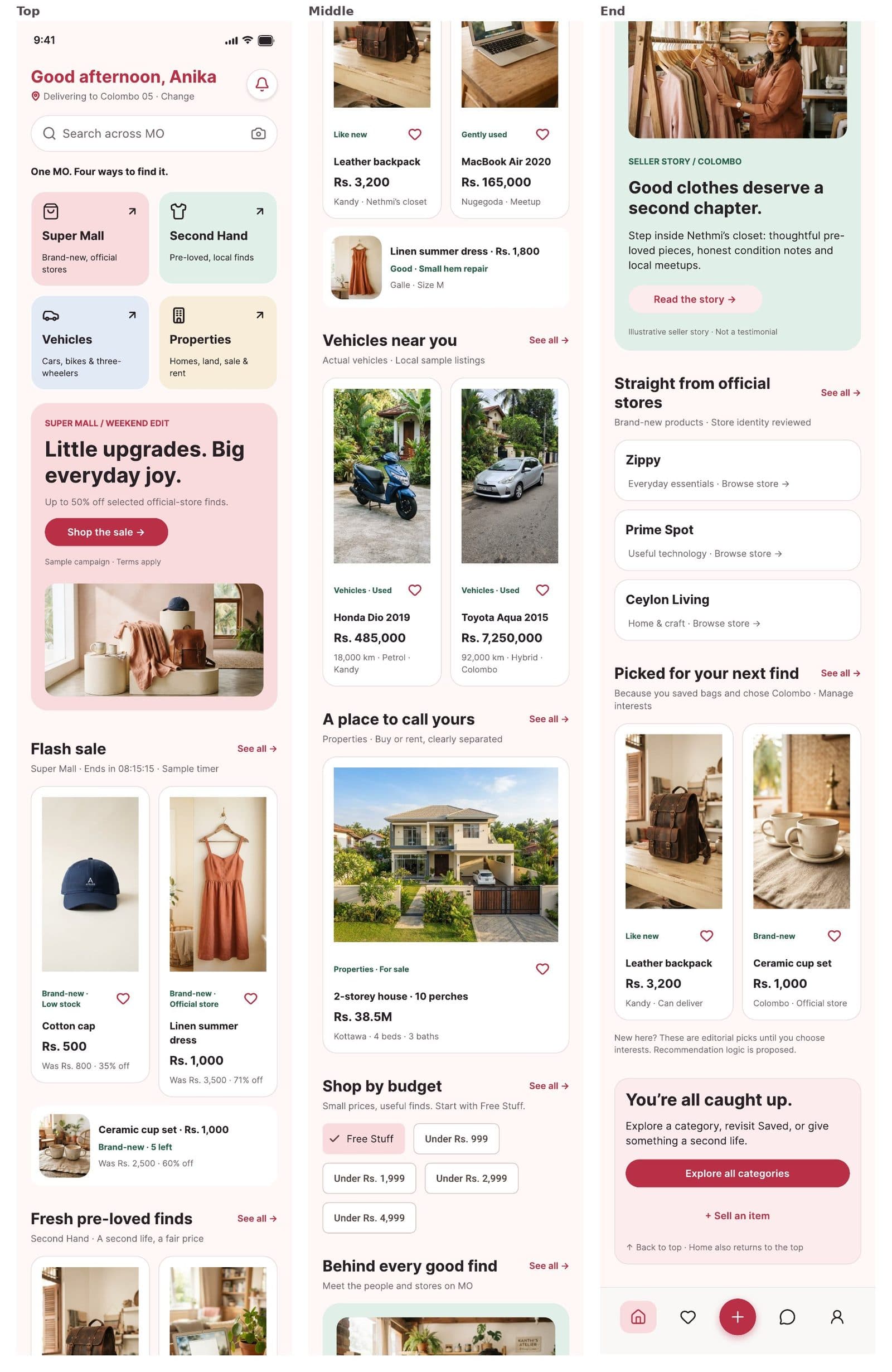
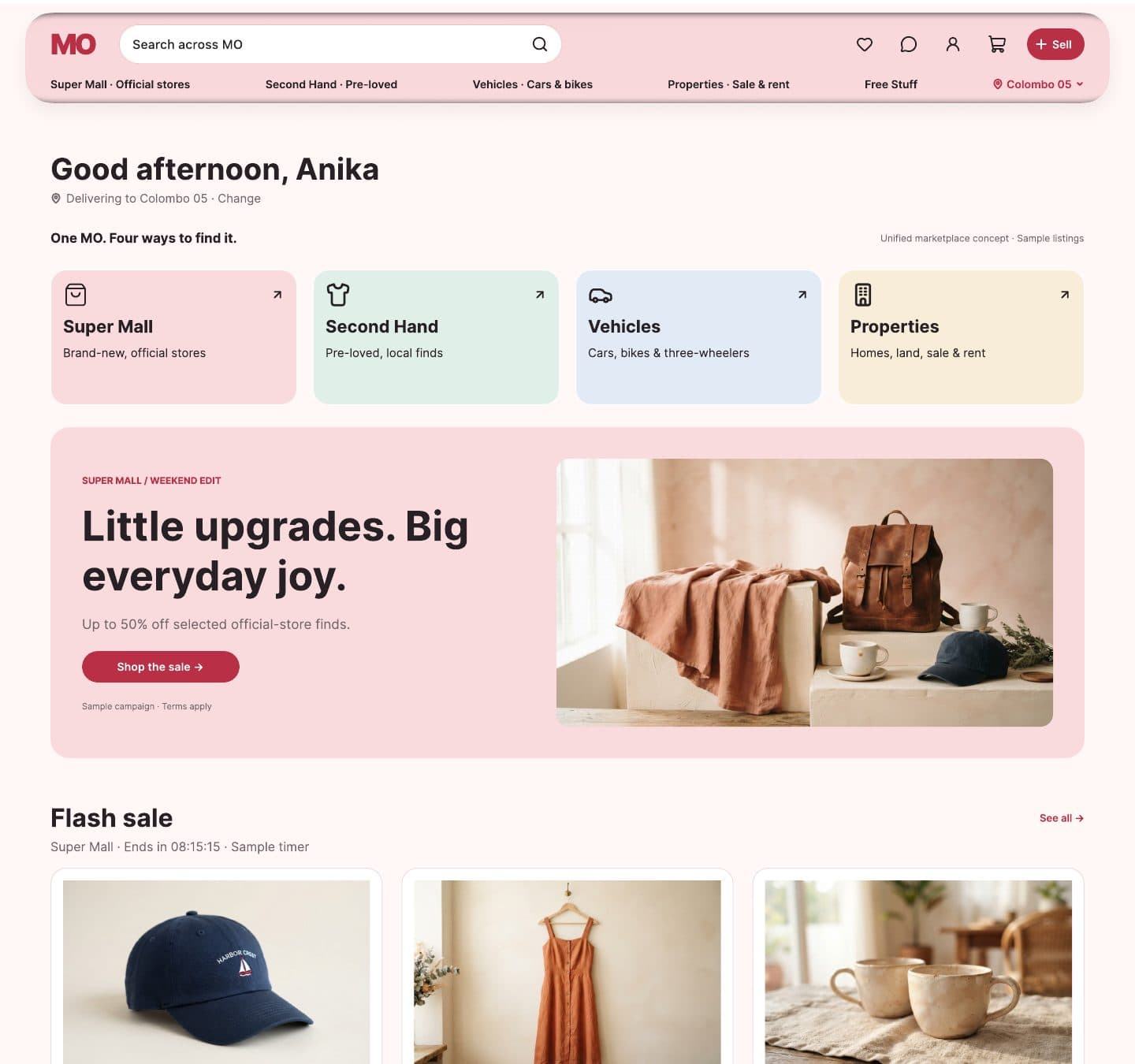
The redesigned home screen answers three questions in order: What is MO? What's happening now? What's here for me? Greeting and location come first, since location changes what MO can offer. Search follows immediately, so people who already know what they want don't have to scroll.
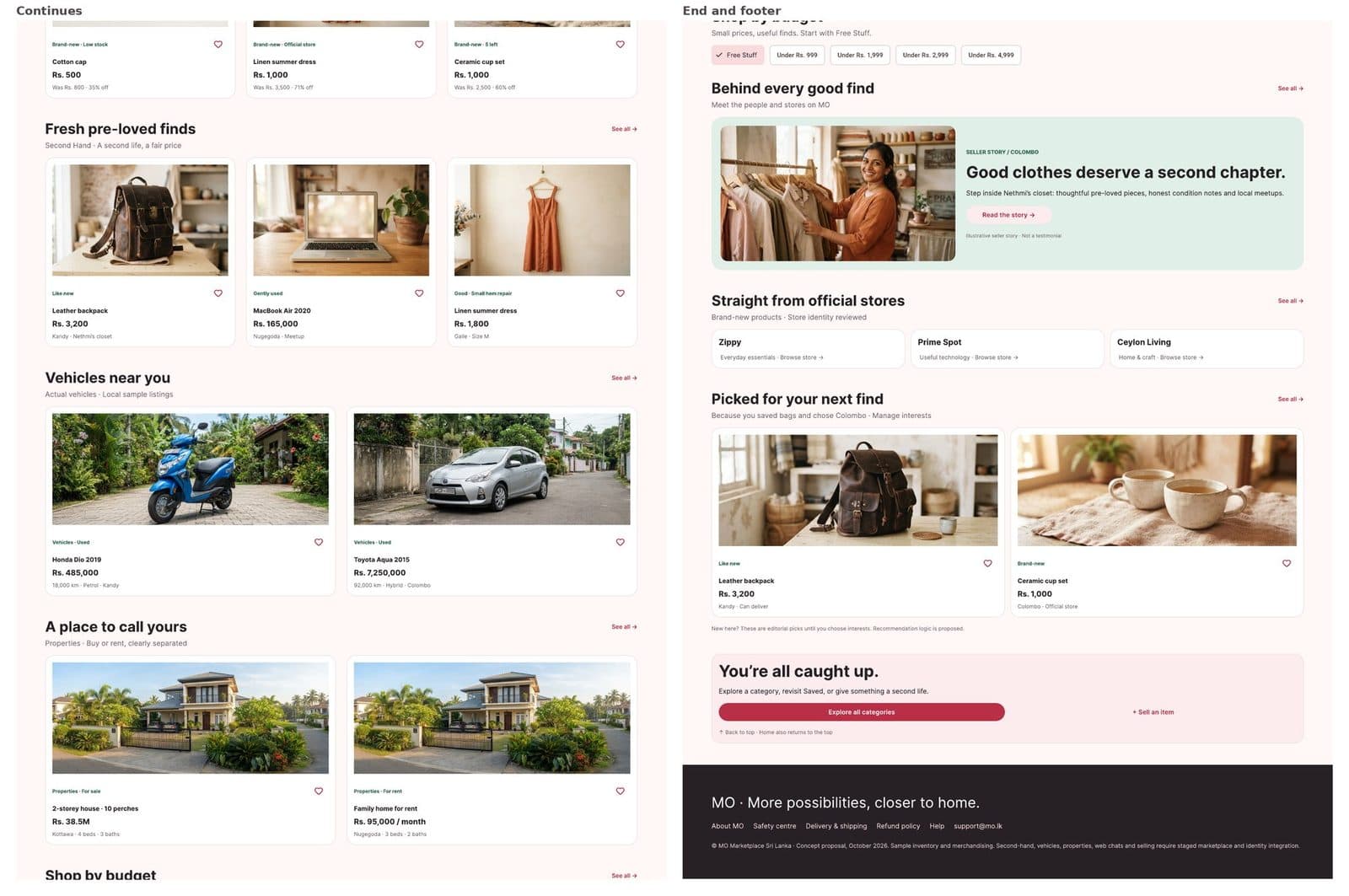
Four entrances sit under the line "One MO. Four ways to find it," each with a name, an icon and a one-line description, so no meaning depends on colour alone. One campaign banner follows the entrances, not before them: one banner, not a rotating carousel. Below that comes one shelf per experience in the same order as the entrances (Flash sale, Fresh pre-loved finds, Vehicles near you, A place to call yours), then Shop by budget starting with Free Stuff, which used to be buried inside Women's Fashion, a seller story and official stores, reasoned picks, and an ending state that reads "You're all caught up." Every shelf's cards are built for what that shelf's buyer actually needs: condition, locality and seller for pre-loved items, mileage and fuel for vehicles, sale or rent, beds and baths for properties, and a save button on every card.
The trade-off I made on purpose: no product is visible in the first iPhone viewport. The brief's first goal was understanding the four experiences within seconds, and four clear entrances do that better than two product cards would. Search and the entrances are both one tap from products. If testing showed people missing products, the campaign banner is the first thing I'd shrink.
Chapter 5
One Product, Two Platforms
Desktop keeps the same names, colours and card anatomy, and spends the extra width on navigation.
The desktop version isn't a stretched phone. It keeps the same names, colours, icons, card anatomy and section order as the iPhone build, and spends the extra width on navigation and denser browsing: a top bar plus a row with the four experiences, Free Stuff and location, instead of a tab bar for Home, Saved, Sell, Chat and Account; one row of four entrances instead of a 2 by 2 grid; three to four cards per shelf row instead of two; and 64 pixel gutters instead of 20 point gutters and 44 point touch targets.
On desktop, the four experiences become permanent navigation on every page, not just home. MO's current website only sells brand-new stock, so I labelled the desktop marketplace features as a phased concept rather than presenting them as a simple reskin of something that already existed.
Chapter 6
Ranking the Rest of the App
Seventeen improvements ranked by how directly they touch trust, cost or payment.
For the second task, I ranked 17 improvements from P0 to P2 by how directly they affect trust, cost or payment at the moment someone decides to buy, chat or sell, each with the evidence behind it, a business-impact hypothesis, and a way to validate it.
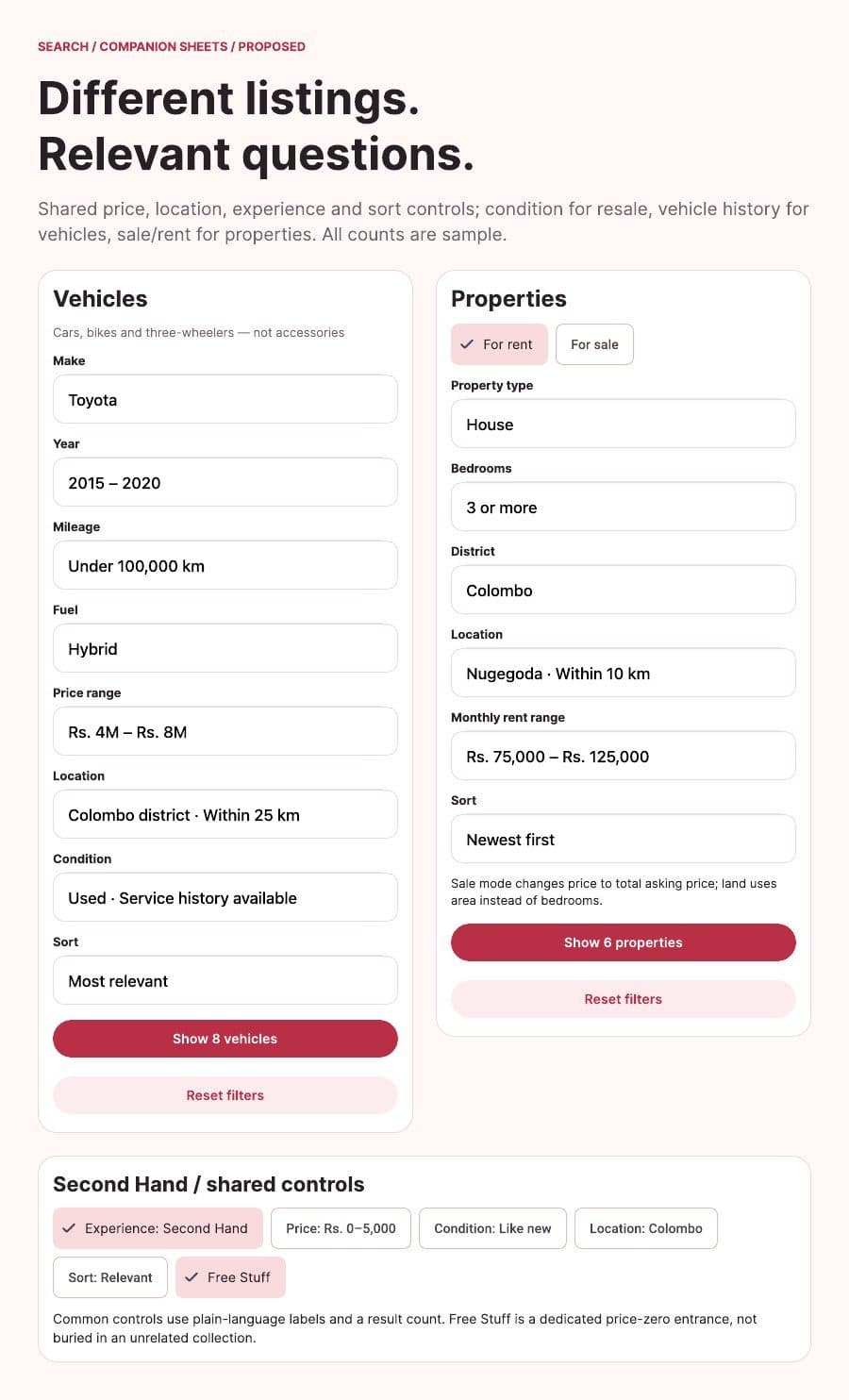
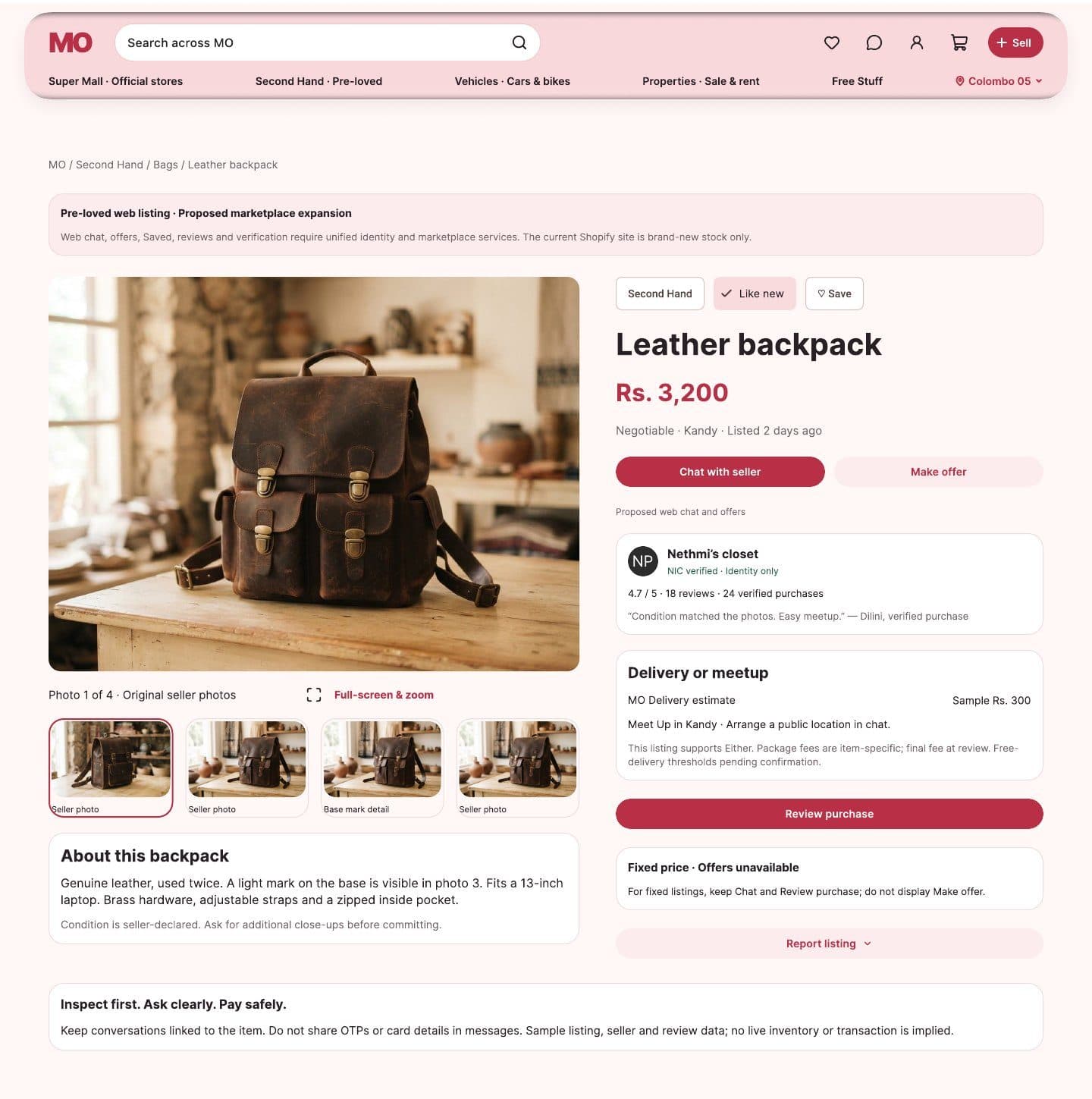
The top five: checkout wording and order, so the flow reads Review, then Payment, then Confirmation, with a buyer-protection summary instead of an "I agree to no refunds" checkbox. Payment recovery, so when a card fails the message stays on screen, typed details are kept, and the buyer can retry or switch to Koko, with whether MO Coins and Koko can be combined shown before choosing. Honest seller trust, so identity is kept separate from rating, reviews are linked to real purchases, and new sellers show "New seller, Unrated." One cost policy, so a single business-owned source feeds every delivery estimate instead of three different numbers. And visible negotiation and safety, so Chat and Make offer sit beside Buy on negotiable listings, with a safety notice in chat. Vehicles and properties also got their own filters, because someone buying a car asks different questions from someone renting a house.
Chapter 7
A Prototype That Can Fail
A clickable HTML prototype built to show what happens when something goes wrong, not just the happy path.
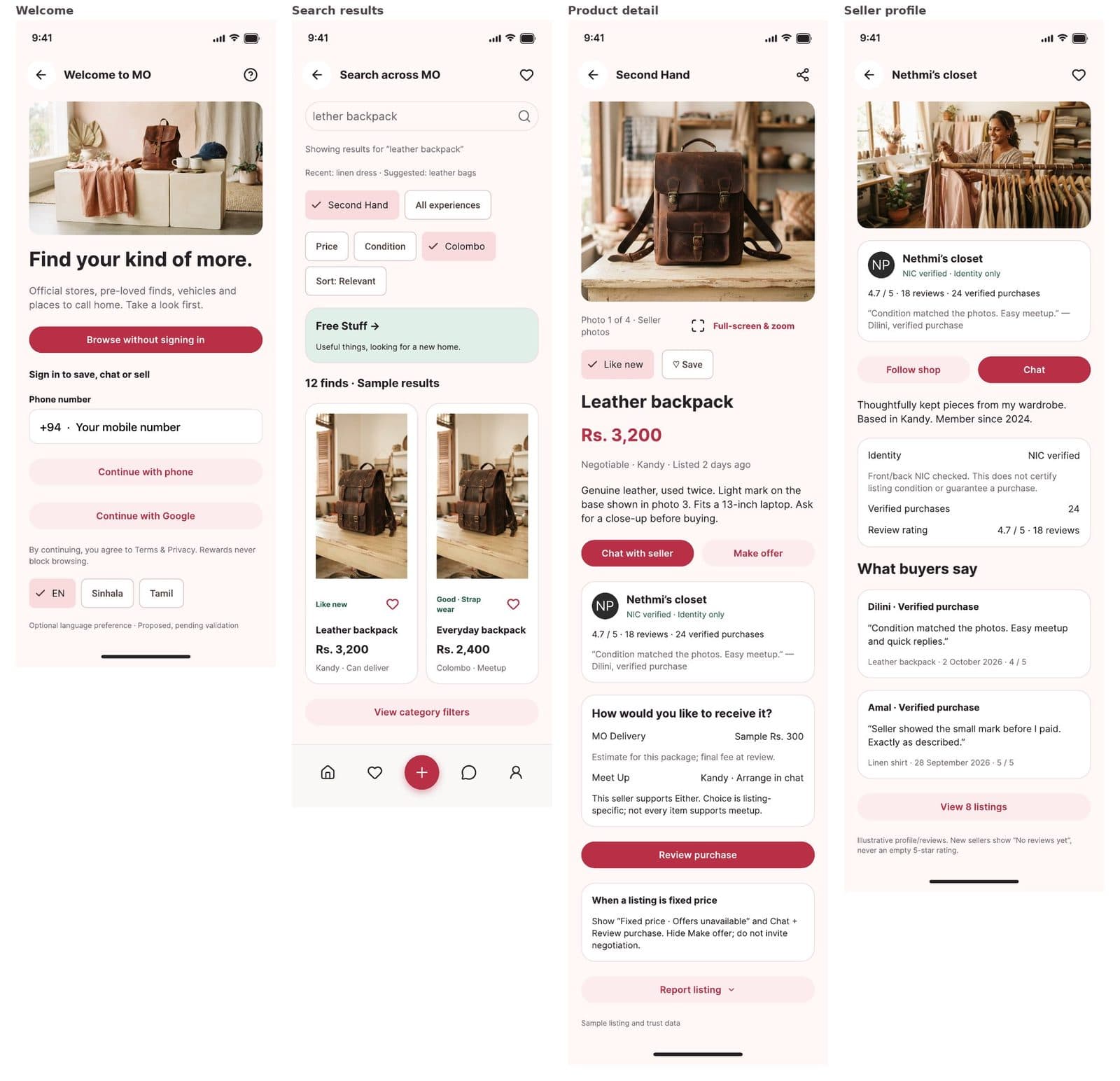
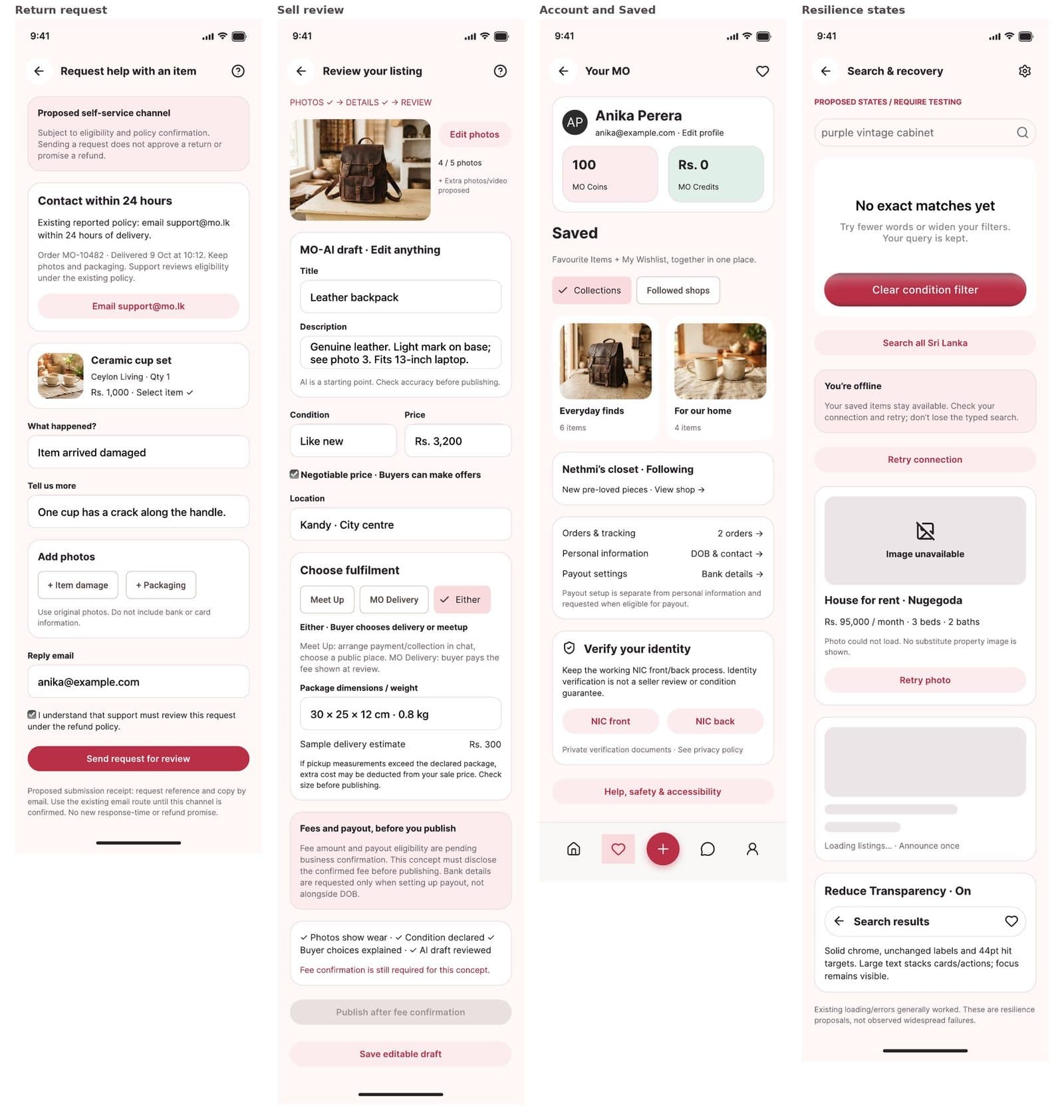
Static click-throughs can't show what happens when something goes wrong, so alongside the Figma prototype I built a clickable HTML prototype for mobile and desktop, sharing one data set, so saving an item on one shows up on the other.
Reviewers can search for "lether backpack," misspelled, and still find it, then filter by price, condition and location. They can make a low offer and get a counter-offer from the seller, ask the seller for a close-up of a mark and receive a photo back in chat, have the first card payment fail on purpose and recover without losing anything, track the order through four milestone groups and start a return, and switch on Reduce Transparency and larger text to see the accessible fallbacks.
Chapter 8
Design Honest Enough to Show It
A deliberately small system where glass is reserved for chrome, and ratings can't lie.
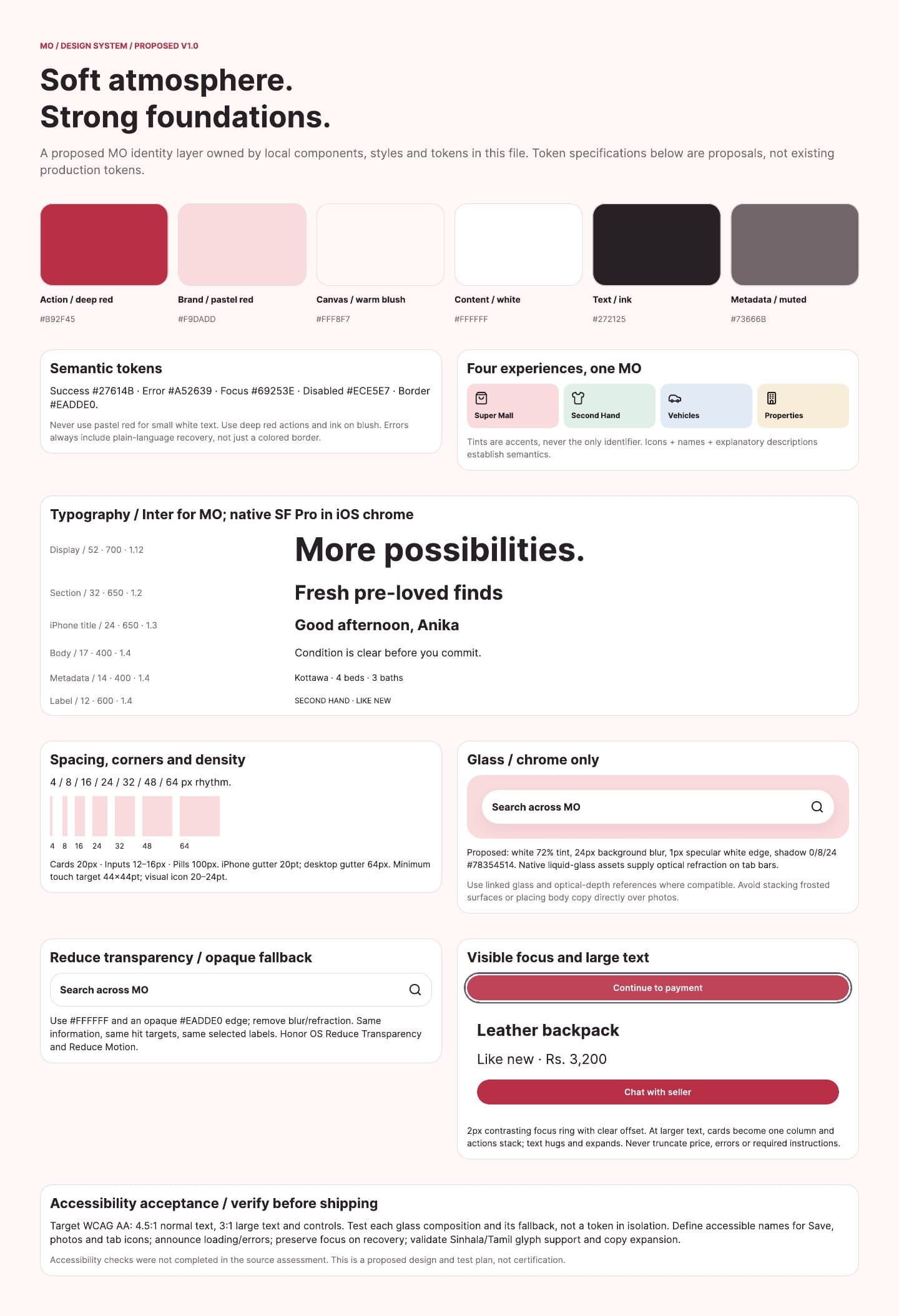
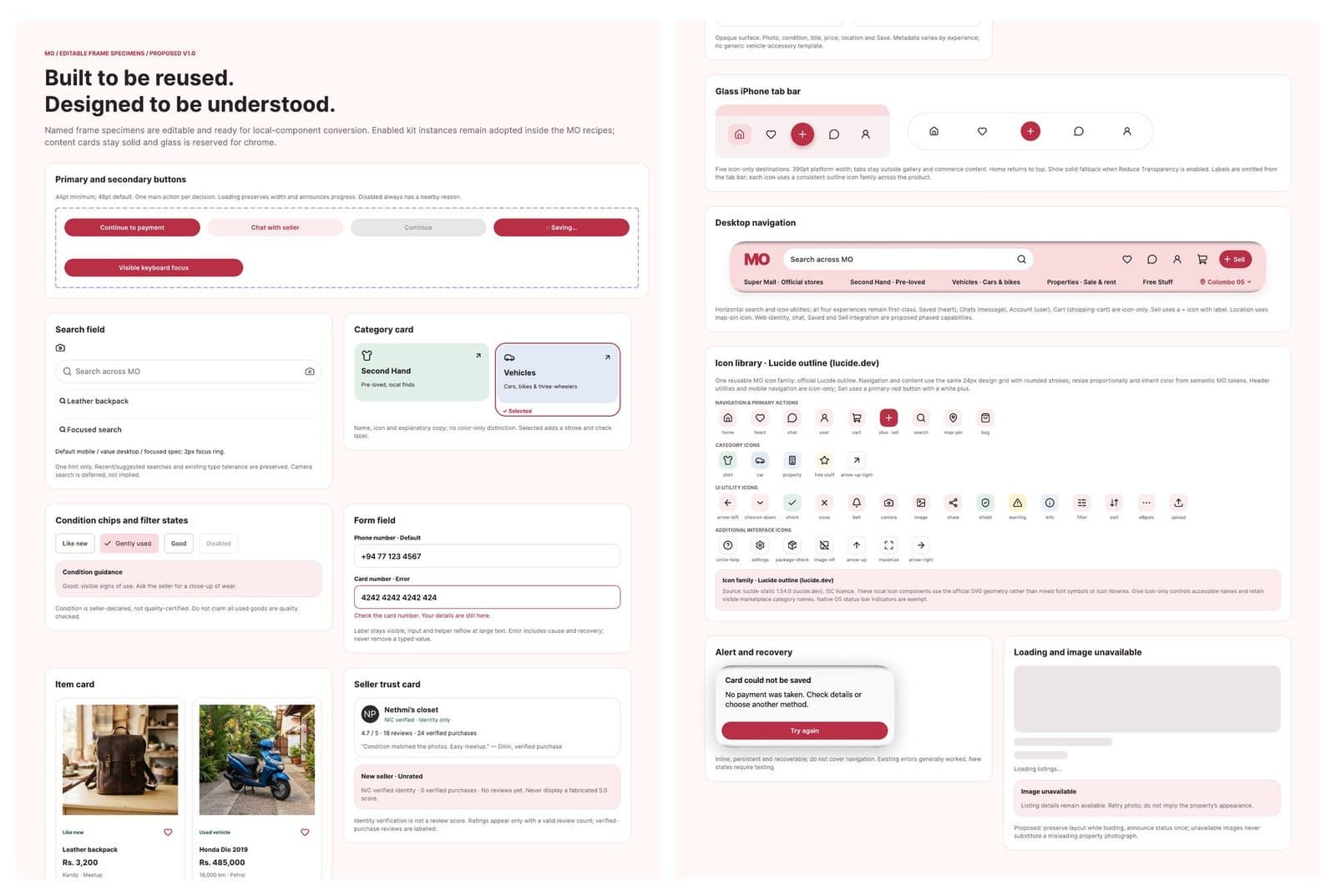
The system is deliberately small: warm, but built around rules that make honest information easy to show. Pastel red is a warm surface colour only. Deep red carries every action. Text is always ink on opaque surfaces. Glass is reserved for chrome, meaning the tab bar and navigation, so prices and trust information always sit on solid surfaces, with an opaque fallback for Reduce Transparency.
Components carry their own honesty rules. Condition is labelled as seller-declared. "NIC verified" says "Identity only." Ratings only appear with a review count, so a new seller shows "New seller, Unrated" rather than a fabricated empty five stars. Contrast is checked against WCAG: white text on deep red measures 5.91 to 1, a pass, while white on pastel red measures 1.30 to 1, which is why that pairing is never used for text. Accessibility targets run through the whole system too: 44 point minimum touch targets, visible 2 pixel focus rings, text that reflows at larger sizes, and Lucide outline icons with accessible names.
Chapter 9
What I'd Test Next
Five decisions I'd defend, and the studies I'd run before trusting any of it.
Nothing here has been tested with users, and every business impact is a hypothesis, not a result. Five decisions I'd defend if asked: removing the chip row, since two routes to the same four places confuse people and the entrances already do that job; entrances above products, since comprehension within seconds was the first goal, ahead of showing products above the fold; one campaign instead of an auto-rotating carousel, since hidden slides get little attention and add motion for no benefit; no "Verified sellers" badge, since ID checks confirm identity, not quality, and a badge has to be true; and Saved in the tab bar rather than a Categories tab, since categories are already reachable through the entrances and search, while the existing wishlist was buried ninth in the profile menu.
The first studies I'd run, with baselines from the current app: can people name MO's four experiences after five seconds on home? Can they find a pre-loved item and choose the right experience for a goal? Can they predict the total cost before paying? How do they read identity versus rating? I'd recruit across languages, including Sinhala, Tamil and English, across regions, and across accessibility needs.
A few lessons carried past this one project. Walking the product before judging it turned most of the fix list from "build this" into "show this," cheaper to ship and more respectful of the team's existing work. Honesty turned out to be a design material in its own right: the most valuable change on the home screen wasn't visual, it was removing claims the product couldn't keep, and building components that simply can't display a misleading rating. And a trade-off is only a real decision if you can say what would change your mind; writing that down for each call made the reasoning stronger and easier to argue with.